Concept:
I will be creating a 3D handpainted environment with a three-part narrative in Unreal. The setting will be a campsite on a floating island. Each part of the story will be tied to a time of the day; morning, evening and night. Which you can toggle between using three buttons on the HUD. The story will follow a boy scout as he sets up his tent, roasts marshmallows in the evening and spends his first night in the wilderness. Meanwhile, Bigfoot will be in the forested background, slowly creeping closer to the campsite until he steals the boy scouts bag of marshmallows and disappears with them.
The visual style for this project will be cartoon-like. The models are going to be low poly and simplistic shapes but will have detailed and high-quality hand-painted textures. I’m hoping to imitate the saturated colour palettes and texturing styles that are popular in games such as Overwatch, World of Warcraft and Gigantic. However, I plan on emulating the aesthetically pleasing lighting style used in the Miyazaki-inspired game, Way to the Woods.
My Client & Target Audience:
I found it difficult to decide on who my client would be. My project is more of an interactive art piece than a video game. A game, to me, has a high level of interactivity and is designed for entertainment. Whereas my project is a form of interactive art that involves the spectator in a way that allows the art to achieve its purpose – in my case to tell a story. However, I got to thinking and decided that my client would be a book company and my project would be used in displays to advertise a new three-panel comic book for children that’s soon to be released.
It has a short story, introduces the characters and the floating island can be treated as a vertical slice that shows a portion of the world’s setting. The project can be shown at expos and stalls to get kids interested in the product. Similar to the free to play demo setups you see in Game stores, my project could be set up in book stores for anyone to interact with.
As for my target audience, I researched popular comics and who they appealed to the most. I found a useful site called ‘Brandora Licensing’ Which gives you all the information a registered company or product has.
The ‘Peanuts’ comic’s target audience is geared towards adults who grew up with the comics and feel nostalgic when reading them, parents – particularly mothers with children 0-5 years old, young kids and tweens around 6-13 years old. The ‘Garfield’ comics were a little more difficult to get information on since the company was only registered on Brandora’s German website. However, one Google Translate later, I found that the comic’s target audience is parents, kids and teenagers around 4 – 14 years old as well as cat lovers.


Based on this information, my target audience will be adults (parents) who are fans of the fantasy/urban legend genre as well as kids and tweens age 4 and up. I think my project will appeal to all genders as I don’t plan on sticking to gender roles or stereotypes. Despite the main character being a boy scout, I think the colour palette, style and fantasy-esque setting will appeal to young girls just as much.
Required Resources:
To complete this project to a high standard, I will need access to;
- A high-quality graphics monitor
- A high-quality graphics tablet or Ipad
- Art software (Adobe Package, Procreate, ClipStudio, etc.
- Modelling and Sculpting software (Maya and Zbrush)
- Internet access and other learning resources
- Sketchpad and basic stationery
Restrictions:
Limitations and challenges I will have to overcome during this project are;
- Lack of experience with environment design, character rigging and coding.
- This is my first time working with this particular art style
- The time Constraints
- Working from home – distracting environment.
Programs I will be using:
- Unreal – Lighting, texture tests, UI and the final product will be coded and set up here.
- Procreate + Photoshop – I will mainly be making textures/concept art in Procreate because it has a screen record feature which is useful for documenting progress. However, any tweaks and edits will be handled in photoshop. The two programs are cross-compatible.
- Maya – All modelling and character rigs will be done in Maya.
- Zbrush/Mudbox – I plan on downloading a trial version of the program and doing all sculpts, especially for characters, here. If I can’t I’ll be doing all sculpts in Mudbox.
- Adobe Audition – I will test, edit and clean up audio here.
- NVIDIA GeForce – Everything that is not on Procreate will be screen recorded using GeForce to document progress.
- WordPress – All my work, reviews, tasks, etc. Will be recorded here on WordPress.
Time Schedule:
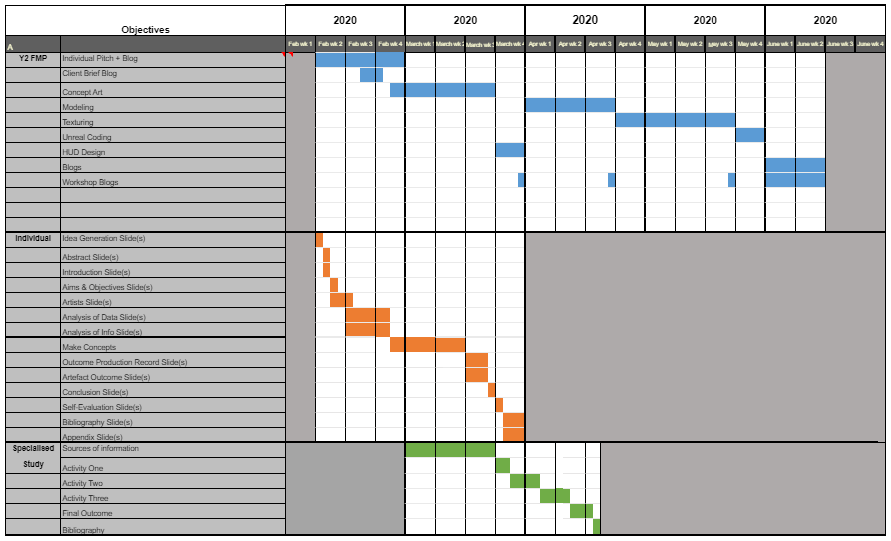
I created a Gantt Chart that includes not only my FMP schedule but other projects that are going on alongside it. Hopefully, I won’t forget about other projects and tasks and can juggle between everything using this to guide me. I judged how much time I needed on each section based off of previous projects. For example, during my year 1 FMP I spent the most time on modelling, so I made sure to give myself a good amount of time to do it. As for the texturing, I know it’s all going to be hand-painted which is not only something I’m very new at, but the style/technique is also very time-consuming. So, I gave myself an ample amount of time to test, practice and finesse textures so they are high-quality also.
What I want to achieve during this project:
Overall, I want to broaden my skills and knowledge in concept design by tackling a new area of it. For the majority of the Games Design course, I have stuck to character and creature design. Although this project does have aspects of it, it primarily focuses on environment and atmosphere. Without it, the whole project will fall apart. So I want to push myself to design, model and texture foliage and objects. Not to mention learn some lighting techniques along the way.
Furthermore, I will be attempting to learn a new colouring and, later down the pipeline, texturing style. I have always been drawn to handpainted art styles. If they are developed properly, the skills you learn from such a style can be used to create either highly realistic or highly stylized pieces. It is one of the most common colouring styles in the concept art community and I would love to use this project as an opportunity to knuckle down and teach myself. You get better with practice and what better way to practice digital painting than by painting every single asset of a project.
 Meg's FMP Zone